TestScript Overview
TestScript is a FHIR resource that defines a set of tests to execute against a FHIR server. FHIR Frog provides complete TestScript execution support.
Use TestScript Shorthand (TSH)
While TestScripts can be written in JSON or XML, we recommend using TSH (TestScript Shorthand) for a much more concise and readable syntax. TSH is designed to eventually merge into FSH.
What is a TestScript?
A TestScript defines:
- Fixtures - Test data to use
- Variables - Values extracted from responses
- Setup - Operations to run before tests
- Tests - The actual test cases
- Teardown - Cleanup operations
Basic Structure
Execution Flow
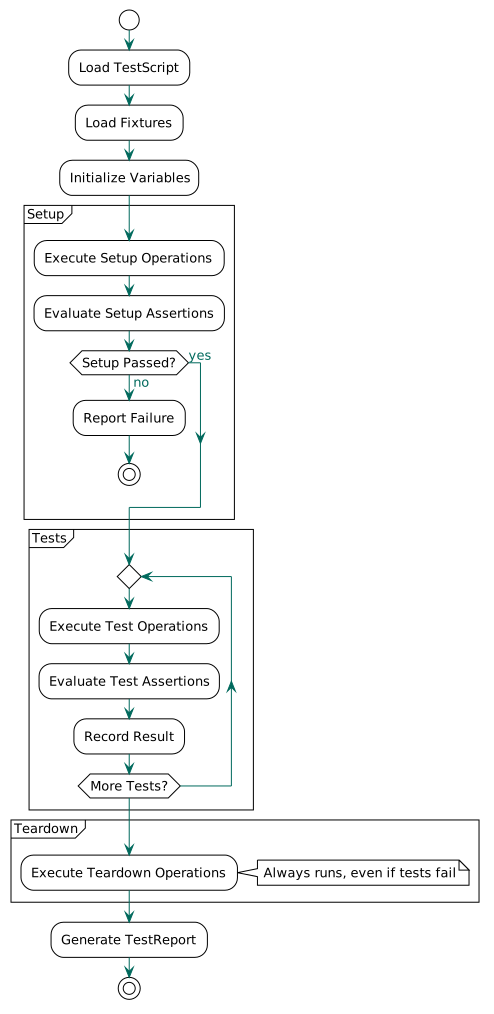
Simple Example
{
  "resourceType": "TestScript",
  "id": "patient-create",
  "name": "PatientCreate",
  "status": "draft",
  "description": "Test creating a patient",
  "fixture": [{
    "id": "patient",
    "resource": {
      "reference": "sample-patient"
    }
  }],
  "test": [{
    "name": "Create patient",
    "action": [
      {
        "operation": {
          "type": {"code": "create"},
          "resource": "Patient",
          "sourceId": "patient",
          "responseId": "create-response"
        }
      },
      {
        "assert": {
          "response": "created",
          "sourceId": "create-response"
        }
      }
    ]
  }]
}
Key Concepts
Operations
Operations perform FHIR interactions:
- create - POST a resource
- read - GET a resource by ID
- update - PUT a resource
- delete - DELETE a resource
- search - Search for resources
- transaction - Execute a transaction bundle
See Operations for details.
Assertions
Assertions validate responses:
- response - Check HTTP status code
- responseCode - Specific status code
- resource - Validate resource type
- expression - FHIRPath expression
- validateProfileId - Profile validation
See Assertions for details.
Variables
Variables extract and reuse values:
{
  "variable": [{
    "name": "patientId",
    "expression": "Patient.id",
    "sourceId": "create-response"
  }]
}
Use with ${variableName} syntax:
See Variables for details.
Fixtures
Fixtures provide test data:
{
  "fixture": [{
    "id": "patient",
    "autocreate": false,
    "autodelete": false,
    "resource": {
      "reference": "sample-patient"
    }
  }]
}
Reference points to a file in src/test/resources/fhir/ (without .json extension).
See Fixtures for details.
Complete CRUD Example
{
  "resourceType": "TestScript",
  "id": "patient-crud",
  "name": "PatientCRUD",
  "status": "draft",
  "fixture": [{
    "id": "patient",
    "resource": {"reference": "sample-patient"}
  }],
  "variable": [{
    "name": "patientId",
    "expression": "Patient.id",
    "sourceId": "create-response"
  }],
  "setup": {
    "action": [
      {
        "operation": {
          "type": {"code": "create"},
          "resource": "Patient",
          "sourceId": "patient",
          "responseId": "create-response"
        }
      },
      {
        "assert": {
          "response": "created",
          "sourceId": "create-response"
        }
      }
    ]
  },
  "test": [
    {
      "name": "Read patient",
      "action": [
        {
          "operation": {
            "type": {"code": "read"},
            "resource": "Patient",
            "params": "${patientId}",
            "responseId": "read-response"
          }
        },
        {
          "assert": {
            "response": "okay",
            "sourceId": "read-response"
          }
        },
        {
          "assert": {
            "resource": "Patient",
            "sourceId": "read-response"
          }
        }
      ]
    },
    {
      "name": "Update patient",
      "action": [
        {
          "operation": {
            "type": {"code": "update"},
            "resource": "Patient",
            "sourceId": "patient",
            "responseId": "update-response"
          }
        },
        {
          "assert": {
            "response": "okay",
            "sourceId": "update-response"
          }
        }
      ]
    },
    {
      "name": "Search patient",
      "action": [
        {
          "operation": {
            "type": {"code": "search"},
            "resource": "Patient",
            "params": "?family=Smith",
            "responseId": "search-response"
          }
        },
        {
          "assert": {
            "response": "okay",
            "sourceId": "search-response"
          }
        },
        {
          "assert": {
            "resource": "Bundle",
            "sourceId": "search-response"
          }
        }
      ]
    }
  ],
  "teardown": {
    "action": [{
      "operation": {
        "type": {"code": "delete"},
        "resource": "Patient",
        "params": "${patientId}"
      }
    }]
  }
}
Best Practices
1. Use Descriptive IDs
2. One Assertion Per Action
"action": [
  {"operation": {...}},
  {"assert": {"response": "okay"}},
  {"assert": {"resource": "Patient"}}
]
3. Always Clean Up
"teardown": {
  "action": [{
    "operation": {
      "type": {"code": "delete"},
      "params": "${patientId}"
    }
  }]
}
4. Extract Variables Early
"setup": {
  "action": [
    {"operation": {..., "responseId": "create-response"}},
    // Variable extracted automatically after operation
  ]
}
5. Use Transaction Bundles for Related Resources
{
  "operation": {
    "type": {"code": "transaction"},
    "sourceId": "bundle-with-patient-and-observation"
  }
}
Running TestScripts
JUnit
CLI
Maven
<execution>
  <goals><goal>test</goal></goals>
  <configuration>
    <testScript>patient-crud.json</testScript>
  </configuration>
</execution>
Next Steps
- Operations - All operation types
- Assertions - All assertion types
- Variables - Variable extraction and substitution