TestScript Variables
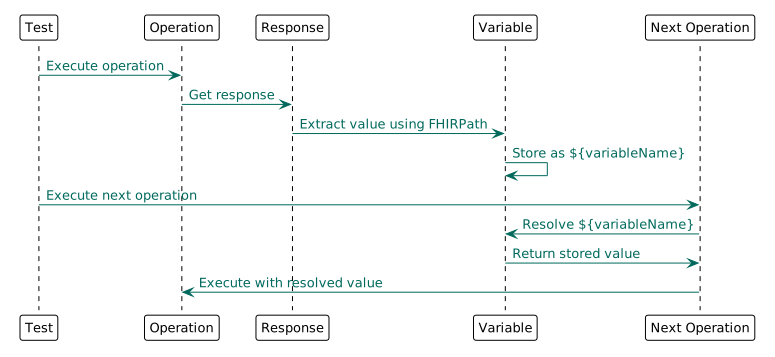
Variables extract and store values from responses for reuse in subsequent operations and assertions.
Basic Variable Extraction
Extract from Response
{
  "variable": [
    {
      "name": "patientId",
      "expression": "Patient.id",
      "sourceId": "createResponse"
    }
  ]
}
Use in Operation
FHIRPath Expressions
Simple Path
{
  "name": "familyName",
  "expression": "Patient.name.first().family",
  "sourceId": "patientResponse"
}
Identifier Value
{
  "name": "medicareNumber",
  "expression": "Patient.identifier.where(system='http://ns.electronichealth.net.au/id/medicare-number').value",
  "sourceId": "patientResponse"
}
Reference ID
{
  "name": "subjectId",
  "expression": "Observation.subject.reference.replace('Patient/', '')",
  "sourceId": "observationResponse"
}
Variable Scope
Test-Level Variables
Defined in test setup, available throughout the test:
{
  "test": [
    {
      "name": "Patient CRUD",
      "action": [
        {
          "operation": {
            "type": {"code": "create"},
            "resource": "Patient",
            "sourceId": "patient-fixture",
            "responseId": "createResponse"
          }
        },
        {
          "assert": {"responseCode": "201"}
        }
      ]
    }
  ],
  "variable": [
    {
      "name": "patientId",
      "expression": "Patient.id",
      "sourceId": "createResponse"
    }
  ]
}
Setup Variables
Defined in setup, available to all tests:
{
  "setup": {
    "action": [
      {
        "operation": {
          "type": {"code": "create"},
          "resource": "Patient",
          "sourceId": "patient-fixture",
          "responseId": "setupPatient"
        }
      }
    ]
  },
  "variable": [
    {
      "name": "sharedPatientId",
      "expression": "Patient.id",
      "sourceId": "setupPatient"
    }
  ]
}
Common Patterns
Extract ID from Location Header
{
  "name": "createdId",
  "headerField": "Location",
  "expression": "substring-after(headerField, 'Patient/')"
}
Extract from Bundle
{
  "name": "firstPatientId",
  "expression": "Bundle.entry.first().resource.id",
  "sourceId": "searchResponse"
}
Extract Multiple Values
{
  "variable": [
    {
      "name": "patientId",
      "expression": "Patient.id",
      "sourceId": "createResponse"
    },
    {
      "name": "patientVersion",
      "expression": "Patient.meta.versionId",
      "sourceId": "createResponse"
    },
    {
      "name": "patientLastUpdated",
      "expression": "Patient.meta.lastUpdated",
      "sourceId": "createResponse"
    }
  ]
}
Variable Usage
In URL Parameters
In Search Parameters
{
  "operation": {
    "type": {"code": "search"},
    "resource": "Observation",
    "params": "?subject=Patient/${patientId}"
  }
}
In Assertions
In Fixtures (Dynamic)
Variables can be used in fixture references:
{
  "operation": {
    "type": {"code": "update"},
    "resource": "Patient",
    "params": "/${patientId}",
    "sourceId": "updated-patient-${patientId}"
  }
}
Default Values
Provide fallback values:
Complex Extractions
Nested Resources
{
  "name": "practitionerId",
  "expression": "Bundle.entry.where(resource.resourceType='Practitioner').resource.id.first()",
  "sourceId": "transactionResponse"
}
Conditional Extraction
{
  "name": "activeStatus",
  "expression": "Patient.active.toString()",
  "sourceId": "patientResponse"
}
Date/Time Manipulation
{
  "name": "observationDate",
  "expression": "Observation.effectiveDateTime.substring(0, 10)",
  "sourceId": "observationResponse"
}
Variable Diagram
Best Practices
- Use descriptive names -
patientIdnotid1 - Extract early - Get IDs immediately after creation
- Validate extraction - Assert variable exists before using
- Use FHIRPath - More reliable than path-based extraction
- Document complex expressions - Add comments explaining logic
Validation Pattern
Always validate extracted variables:
{
  "action": [
    {
      "operation": {
        "type": {"code": "create"},
        "resource": "Patient",
        "sourceId": "patient-fixture",
        "responseId": "createResponse"
      }
    },
    {
      "assert": {
        "expression": "Patient.id.exists()",
        "description": "Patient ID must be present for extraction"
      }
    }
  ]
},
{
  "variable": [
    {
      "name": "patientId",
      "expression": "Patient.id",
      "sourceId": "createResponse"
    }
  ]
}
Next Steps
- Operations - Use variables in operations
- Assertions - Assert on variable values
- Fixtures - Combine with fixtures for dynamic tests